Three ways in
A username or email with your password, a Remember Me tick box and a Telegram button on the same form.
Sign in to PandiBet from your computer or phone
Username or email with a password, a Telegram button, two-factor authentication and live chat on weekdays if you get locked out
PandiBet login at a glance
Three ways in
A username or email with your password, a Remember Me tick box and a Telegram button on the same form.
Two-factor authentication
An authenticator app guards your account, and every connection to the site uses TLS encryption.
Phone unlock
Fingerprint or Face ID on your phone, with the biometric data staying on the device.
Keeping your account safe
What to do
What to avoid
The PandiBet login form takes a username or an email address with a password. It also has a Remember Me tick box, a Forgot password? link and a Telegram button, and new players use the registration link that sits beside it. One account serves every device, so the balance, the history and the AUD currency are the same wherever you sign in.

| Element | What it does |
|---|---|
| Username or email | The identifier you registered with |
| Password | The password you chose at registration |
| Remember Me | Keeps you signed in on that device |
| Forgot password? | Sends a reset link by email |
| Telegram | Lets you sign in through your Telegram account |
The Telegram button suits players who already keep Telegram open on their phone, and the password route suits everyone else. Remember Me saves retyping your details on a computer that only you use.
If you share a device, leave Remember Me unticked, because the session would stay open for the next person who picks it up.
Three layers protect your login: TLS encryption of every connection, two-factor authentication and phone unlock. You manage them from your account area, next to the responsible gambling limits.
You switch it on with an authenticator app, and Google Authenticator, Authy and Microsoft Authenticator all work. The app creates a six-digit code that renews every 30 seconds, and you type it in after your password.
When you activate it, ten backup codes are issued. Store them away from your phone, on paper for instance, so that you can get back in after changing devices. The code is also required to switch the protection off, so nobody else can remove it for you.
On a phone, your fingerprint or Face ID can open your session in place of the password. The biometric data stays on the device, and PandiBet receives no copy of it: the site only gets a confirmation from your phone.
The password stays available as a fallback, for example if the sensor fails to recognise you.
Verification is requested at your first withdrawal. For crypto withdrawals we ask for a passport or an Australian driver’s licence as a colour photo, plus a selfie, and we finish the check within 12 hours of receiving the documents.
For card and bank withdrawals we also ask for a proof of address no older than 3 months, such as a utility bill or a bank statement, and your bank account details (BSB and account number). That check takes 24 hours. You can upload the documents in the Verification section before you ever withdraw, so the account is already verified when you do.
The steps are the same on every device: enter your details, confirm who you are, and arrive in the lobby with the cashier, the Shop and Tier one tap away. The login opens the same account wherever you use it.
Open PandiBet in your browser and click Login in the header. Enter your username or email and your password, tick Remember Me if the computer is yours, and confirm.
If two-factor authentication is on, the site then asks for the six-digit code from your authenticator app. Once it is accepted, you go back to the page you were on, with your AUD balance showing.
On a phone, open the menu and tap Login. The same form appears, and its fields fit your screen. If your phone supports fingerprint or Face ID, you can touch the sensor or look at the screen to open the session instead of typing the password.
The unlock is convenient for daily use, but it does not replace the two-factor code when that protection is on.
Tap the Telegram button on the form, and Telegram asks you to confirm the connection. Once you approve, you land in your account without typing a password.
Use this button only on a device that you control, because anyone who can open your Telegram can also reach the account.
Most login problems come from a forgotten password, a temporary block or a code the site refuses. Each has a short fix, and support steps in when the fix is not enough.
Click Login, then Forgot Password?, enter the email address used at registration and click Reset Password. The email contains a link that is valid for 1 hour. Open it, type the new password twice and click Save.
If the message is slow, check your junk folder and make sure you typed the address you registered with. Choose a password that you do not use anywhere else, then sign in again.
After 5 failed attempts, access is blocked for 30 minutes. Wait for the delay to end instead of repeating the attempts, and if you are not sure of your password, reset it, because a Pandi bet account is easier to recover with a reset than by guessing.
A session left idle is logged out after 30 minutes, which can make a page ask for your details again even though nothing is wrong with the account.
Check the clock on your phone first. The six-digit codes change every 30 seconds and depend on accurate time, so a phone that runs slow produces codes that fail. Switch on automatic date and time, then enter the next code.
If you no longer have the authenticator app, use one of the ten backup codes issued when you activated the protection.
Our live chat opens from the chat button on every page, from Monday to Friday, 6 p.m. to 9 a.m. AEDT, and it is closed at weekends. The average response time is under 3 minutes, and the team answers in English. You can write to [email protected] at any time, including at weekends, with the email address of your account and a screenshot of the error if you have one.
Write to us at once if you received a reset email you did not request, if your account shows a login you do not recognise, or if you lose the phone that holds your authenticator app and your backup codes. Say so in your first message, and the Pandi bet team will guide you through securing the account.
Registration is a single form that takes about a minute, with AUD as the account currency, and it is open to players aged 18+. The form asks for your email address, an optional Refer code, your phone number, an optional promo code and a password typed twice, and you tick a box confirming that you are at least 18 years old and accept the Terms and Conditions and the Privacy policy.
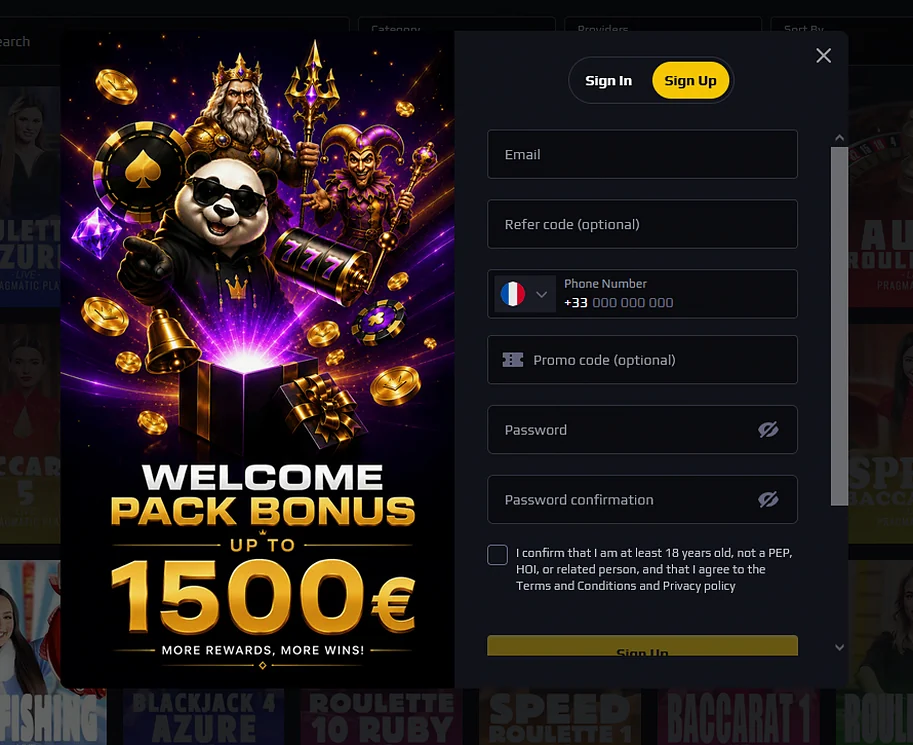
The account is confirmed by email, and the player profile then asks for your name, date of birth, address, country and currency. The welcome pack of 300% up to $2,400 over three deposits is described on the PandiBet bonus page, for players aged 18+.
Questions about signing in
Click Login, then Forgot Password?, enter the email address of your account and click Reset Password. The link we send is valid for 1 hour, and you type the new password twice before clicking Save.
Yes, the login form has a Telegram button next to the username or email field. Use the same method you chose at registration so that you land in the same account.
Five failed attempts block access for 30 minutes. Wait for the delay to end, then try again with the right details, or reset your password if you are not sure of it.
Open your PandiBet account
Claim a 300% welcome pack of up to $1,500 across your first three deposits.
Start playing 18+ only. Gambling carries a risk of addiction, and the bonus terms apply.